Budge World: Learning & Fun
- 4.3
- Rating
- 10.00M
- Installs
- Free
- Price

 Analysis by App-foxy
Some children’s games are easy to open but surprisingly difficult to use well. Budge World: Learning & Fun sits in that interesting middle ground: it brings together familiar characters and short learning activities, yet the experience still depends on how an adult sets it up and guides the first few sessions. I found it most useful as a gentle activity hub for toddlers rather than as a complete teaching program.
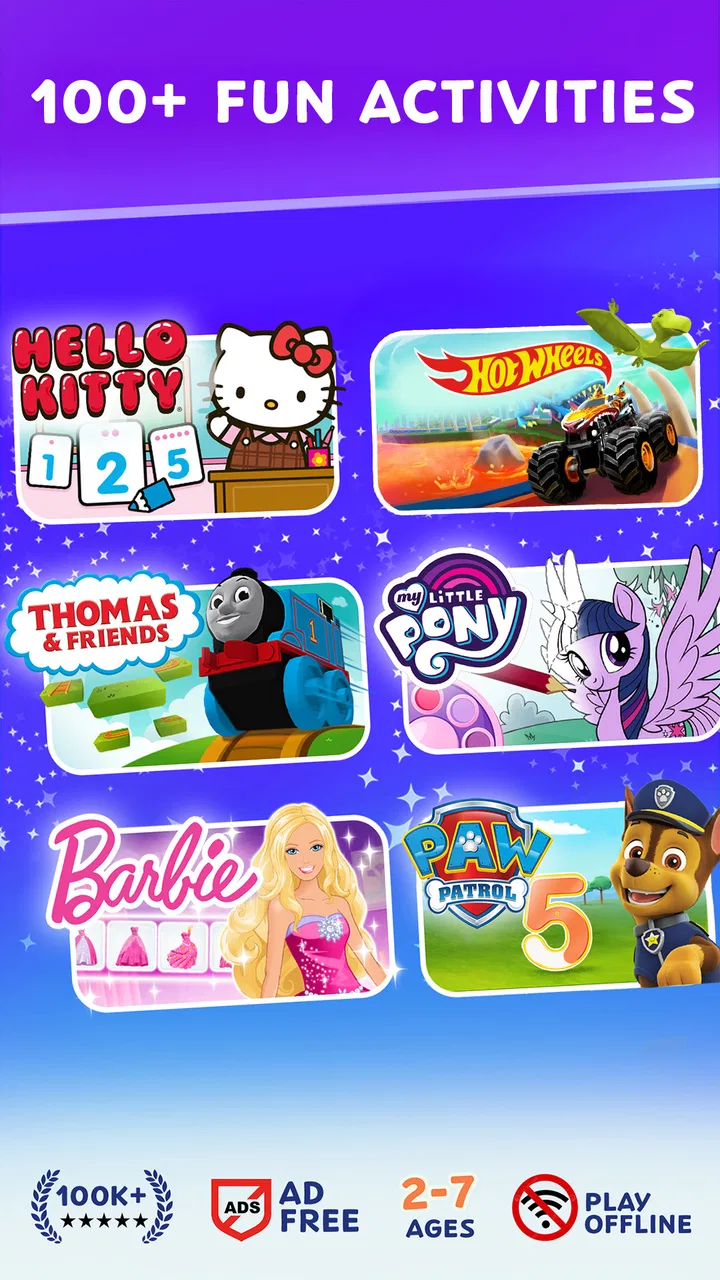
The game is free to download, aimed at Everyone, and made by Budge Studios. Its appeal comes from a collection built around recognizable names such as PAW Patrol, Barbie, Thomas, Hello Kitty, and Crayola. That mix matters because a child who ignores one activity may become interested when a different character appears. In my experience, the strongest part is not any single lesson, but the way the familiar themes can make simple practice feel less like a worksheet.
It has reached over 10 million installs and holds a 4.2 average from around 33 thousand ratings, which suggests that many families find the general format approachable. I would still avoid treating those figures as a guarantee that every child will enjoy it. Toddlers differ widely in attention span, reading ability, and tolerance for repetition. The right question is whether this particular style of guided play fits your child’s routine.
You May Also Like

 Blood Strike: 2.5 Anniversary
Blood Strike’s Loadouts Turn Every Drop Into a Tactical Gamble
A close look at Blood Strike’s custom loadouts: how fast access to signature weapons reshapes its battle royale rhythm, rewards preparation, and narrows the gap between fights.

 Pandora - Music & Podcasts
Pandora’s Music Is Easy to Start, but Harder to Recover
Pandora’s strength is its low-effort path from a seed to a station. Its weak spot is how much confidence it asks you to place in connection, setup, and quiet recovery.

 8 Ball Pool
 Is Built on Rivalries, Rematches, and Routine
A close look at the rivalries, rematches, shared routines, and unanswered safety questions that turn a quick pool match into a persistent mobile community.

 Samsung Music
’s Quiet Strength Is Playing What You Already Own
Its reach comes less from spectacle than from dependable access to a personal library. That simplicity is both the app’s strongest retention engine and its ceiling.

 AccuWeather: Weather Radar
AccuWeather Review: A Quick, Clear Forecast for Everyday Decisions
For everyday plans, the best forecast is the one you can understand quickly. AccuWeather makes rain timing, radar, and local conditions easy to act on, with a few trade-offs.

 Hill Climb Racing
Why Hill Climb Racing Still Turns Crashes Into One More Run
A tiny car, a bumpy hill and one more upgrade: Hill Climb Racing keeps resurfacing because its simple chaos makes every near-miss feel personal.
More From Our News Desk



Where families usually get stuck
The first difficulty is often expectation. A parent may install it expecting one continuous game, while a child sees a broad collection of character-led activities. That difference can make the opening moments feel scattered. I recommend sitting with the child at first and treating the app as a menu of small invitations rather than insisting on a fixed sequence.
Another common sticking point is the contrast between the free starting experience and the wider collection suggested by the presentation. The game is free, but individual in-app purchases range from $6.99 to $47.99 per item. That makes it important to decide in advance how you want to handle locked or paid content. A toddler does not understand why one appealing item opens and another asks for an adult, so a calm explanation prevents the session from turning into a negotiation.
I also noticed that familiar branding can raise expectations beyond what the activities actually deliver. A child may choose PAW Patrol or Barbie because of the character, then discover that the task itself is deliberately simple. That is not a flaw for the intended age group, but older children may find the learning too basic. The recognizable theme is the invitation; it is not necessarily the depth of the activity.
Navigation is another area where adult help can be useful. Even when buttons are visually clear, toddlers can tap quickly, move away from an activity, or open something they did not intend to choose. I found that a short demonstration works better than repeated corrections. Show the child how to return to a preferred activity, then let them try while you stay nearby.
The most useful mindset is to treat Budge World as guided play, not unattended screen time. The activities may be suitable for young children, but suitability does not remove the need for supervision. A child can learn through repetition and exploration, while an adult can notice when the activity is becoming frustrating or when the child is simply tapping without engaging.
What to check before handing over the device
Before the first session, I would open the game yourself and look through the available choices. This takes only a few minutes, but it lets you identify which activities match the child’s current interests and ability. If you hand over the device without checking, the child may land on something confusing and decide the whole game is boring.
It is also worth checking the device’s operating system. The current version is 2026.3.0 and requires Android 5.1 or later. That requirement is modest, but older devices can still behave poorly if storage is nearly full, the system is under heavy load, or the game has not finished updating. A compatible operating system is only the first part of a smooth setup.
For iPhone or iPad users, the same practical principle applies: keep the operating system and the app current, then restart the device if the first launch behaves strangely. I would not begin troubleshooting by repeatedly tapping the screen. Closing the game completely and reopening it is usually a cleaner first step than trying to force a stuck screen to respond.
Because the game is designed for young children, account and purchase decisions deserve attention before play begins. I recommend handling downloads and purchases yourself, keeping the device’s normal purchase protections active, and explaining that some parts are for choosing with an adult. This is less about restricting curiosity and more about avoiding accidental spending when small fingers explore every button.
Sound is easy to overlook. If a child cannot hear instructions or character responses, an activity may appear broken even though the visuals are working. I check the device volume, mute setting, and any connected headphones before assuming there is a problem with the game. For a toddler, sound is often part of the feedback loop, so a silent session can be much less understandable.
Finally, choose a comfortable session length. I found the game works better in short visits than as a long distraction. A child who is tired may repeatedly tap, lose interest, or become upset when an activity does not respond in the way they expect. Ending after a successful activity creates a better routine than waiting until frustration has already taken over.
A practical recovery routine when something goes wrong
When an activity does not load correctly, I use a simple recovery order. First, I wait briefly and avoid tapping many controls at once. Second, I leave the activity and return to it. Third, I close and reopen the game. If that does not help, I restart the device and check whether an update is waiting. This sequence is boring, but it prevents a child from seeing a long chain of increasingly confusing attempts.
If the game opens but feels slow, I check what else is running on the device and whether storage is crowded. Older phones and tablets may struggle more when several demanding apps remain open. Closing unused apps, freeing a little space, and restarting can improve general responsiveness. I would make these changes away from the child, because watching an adult search through settings quickly turns playtime into waiting time.
For a missing sound problem, I check volume and mute controls before reinstalling anything. If only one activity seems quiet, I leave it and test another part of the game. That comparison helps separate a general device issue from a problem limited to one screen. I also check whether headphones are connected without the parent realizing it, a surprisingly common cause of “the game has no sound.”
If a purchase screen appears unexpectedly, I stop the session rather than allowing the child to keep tapping. I then review the device’s purchase settings and decide whether the available free content is enough. The important point is that the game can remain useful without turning every visit into a shopping decision. In my view, a child should be able to enjoy a selected activity without being placed in charge of evaluating paid options.
When progress or a chosen activity seems to have changed after an update or restart, I first look for a simple navigation mistake. Toddlers can easily move to another character or section and assume the original choice has disappeared. Returning to the main selection area and checking carefully is safer than deleting the app immediately. Reinstallation should be a last resort, especially when an adult is unsure how the device handles local progress.
One helpful habit is to remember the child’s successful route. If a particular activity works well, note the character and where it appears in the selection area. The next day, you can guide the child back to it quickly instead of letting them wander through every option. This turns the game into a predictable routine and reduces the chance that setup friction will overshadow the learning.
When the game may not be the cause
Not every disappointing session points to a technical fault. A toddler may reject an activity because they are hungry, tired, or more interested in physical play. I have found that adults sometimes keep changing settings when the real solution is simply to stop and try again later. The game can support a routine, but it cannot replace the child’s readiness to participate.
Touchscreen behavior can also be misleading. Very young children may press with a whole hand, drag instead of tap, or touch several places at once. An activity that expects a deliberate gesture can then appear unresponsive. I usually demonstrate one slow movement and let the child copy it. If the child still cannot control the gesture comfortably, that activity may be developmentally premature even if the game itself is working normally.
Device condition matters too. A cracked screen, a thick case, an unreliable charging connection, or a tablet running with very little free space can affect any interactive game. Before blaming Budge Studios, I test another ordinary touch-based app. If taps fail elsewhere, the wider device needs attention. That small check avoids unnecessary reinstallations and protects the child’s saved routines.
Network conditions may also affect setup or updates, depending on what the device is doing in the background. If the game behaves differently from one location to another, I test it later on a stable connection and make sure the app has finished updating. I would not promise that every loading problem is caused by connectivity, but it is sensible to separate a one-time setup delay from a repeatable in-game issue.
There is also a learning issue that parents can mistake for a software issue. If a child keeps choosing a familiar character but avoids the actual task, they may be enjoying the theme without being ready for the activity. That is useful information. I would switch to a simpler choice, model the task once, and stop if the child remains frustrated. Forcing repetition can make the character itself feel unpleasant.
How it compares with ordinary toddler alternatives
Compared with a single-purpose alphabet, counting, or shape game, this title offers more variety through its character collection. That variety is its clearest advantage for families whose children lose interest quickly. The trade-off is that it may feel less focused. If your goal is concentrated practice in one specific skill, a dedicated educational app can be easier to understand and easier to use consistently.
Compared with open-ended video viewing, the activities give the child something to do rather than merely watch. I prefer that when an adult has time to sit nearby, because the child can respond to prompts and make choices. Still, it should not be presented as a substitute for books, conversation, drawing, blocks, or outdoor play. Its educational value is strongest when it becomes one small part of a varied day.
Compared with a premium app that offers one clearly defined learning path, the character-based approach may feel more playful and less formal. Some parents will appreciate that warmth, while others may want visible structure and measurable progression. I would choose Budge World for engagement and variety, not for a tightly sequenced curriculum.
The recognizable themes are especially useful when a child is hesitant about unfamiliar educational software. A favorite character can make the first tap feel safe. However, the same branding can distract from the learning purpose. I suggest naming the skill you are practicing in simple language—matching, noticing, sorting, or following a direction—so the child gradually connects the fun activity with what they are doing.
Who will get the most from it
I think it suits families looking for short, supervised activities for toddlers and preschool-age children who enjoy switching between familiar characters. It can work well during a brief quiet period, while waiting somewhere, or as a calm activity after a parent has already chosen an appropriate section. The free entry point also makes it reasonable to test the style before considering any paid content.
A realistic everyday use case would be a parent preparing dinner. Instead of giving the child unrestricted access, the parent opens the game, selects one or two suitable activities, checks the sound, and explains that the child should call for help if a screen changes. After a short session, the parent closes the game and moves on to another activity. That workflow keeps the app useful without turning it into an automatic babysitter.
It is less suitable for children who need advanced reading, complex puzzles, or a strong sense of long-term progression. Older children may finish the simple tasks quickly or lose interest in the toddler-focused presentation. It is also not my first choice for parents who want a completely ad-free, purchase-free environment without checking how the free experience is organized.
Families with more than one child should expect different reactions. A younger child may enjoy repeating a familiar activity, while an older sibling may want more challenge and control. I would avoid asking both children to share one session unless the older child is willing to model patiently rather than take over. The game works best when the activity matches the child holding the device.
My final view after using it
Budge World: Learning & Fun is a friendly educational game with a clear practical strength: it uses familiar characters to lower the barrier to early learning activities. I like it most when an adult chooses the starting point, stays close during the first sessions, and treats each visit as a short piece of a larger routine.
The main friction comes from variety, navigation, and the presence of paid content. Those points do not make the game a poor choice, but they do mean that setup matters. Checking the device, confirming sound, deciding how purchases will be handled, and knowing a simple recovery routine can prevent most avoidable frustration.
With a Everyone age rating, a free starting point, and a large audience, it is easy to understand why families try it. The developer is Budge Studios, and the current version is 2026.3.0. I would recommend giving it a trial if your child responds strongly to PAW Patrol, Barbie, Thomas, Hello Kitty, or Crayola and enjoys brief, guided touchscreen activities.
My recommendation is more cautious for anyone seeking a complete educational roadmap or a hands-off solution. In those cases, a focused learning app, traditional play, or a parent-led activity may be better. For the right child and the right routine, though, this game can turn a few spare minutes into playful practice without demanding that every session feel like a lesson.
FAQs for Budge World: Learning & Fun
01What is Budge World: Learning & Fun?
Budge World: Learning & Fun is an educational app designed for kids, offering a safe space for learning and entertainment. It features a variety of games, activities, and interactive content that promote creativity, critical thinking, and problem-solving skills. Parents appreciate its child-friendly interface and diverse educational themes.
02Is Budge World safe for my child?
Yes, Budge World is designed with child safety as a priority. The app includes parental controls, ensuring that children are limited to age-appropriate content. There are no third-party ads, and the app complies with COPPA regulations, making it a secure environment for your child to explore and learn.
03Do I need an internet connection to use Budge World?
An internet connection is required for downloading and updating the app, as well as accessing new content. However, once the games and activities are downloaded, many of them can be played offline. This makes it convenient for on-the-go use, such as during travel or in areas with limited connectivity.
04What age group is Budge World suitable for?
Budge World is designed for children aged 3 to 10. The app offers a wide range of activities and games that are suitable for various developmental stages, with content tailored to different age groups. This ensures that each child can engage with material that is both fun and educational.
05Are there any in-app purchases in Budge World?
Budge World offers a subscription model that provides access to all content. While the app itself is free to download, some features or additional content may require a subscription. Parents can rest assured that there are no surprise purchases, as all transactions require parental approval.
Pros
- Engaging educational games for kids.
- Colorful and interactive graphics.
- Regular content updates.
- Parental control features.
- Supports offline play.
Cons
- In-app purchases can be pricey.
- Limited content without subscription.
- Some games require internet.
- Advertisements can be distracting.
- May not suit older children.

Budge World: Learning & Fun
Gallery